🎓 Lesson 2 — How Computers Process Information
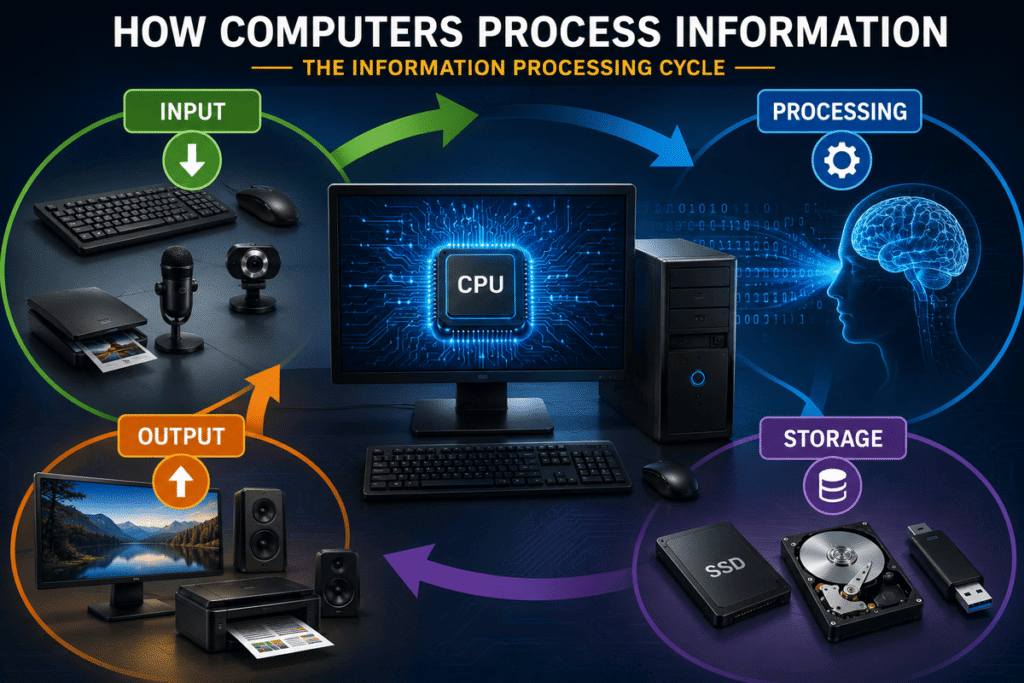
How computers process information is one of the most important concepts to understand when beginning a career in information technology. Every time you type a command, click an icon, open an application, watch a video, search the web, or save a document, your computer performs an organized sequence of operations that transforms raw data into useful results. What appears almost instantaneous on the screen is actually the result of hardware and software working together at extraordinary speed.
Understanding this process changes the way you see computers. Instead of viewing a computer as a mysterious machine that simply “does things,” you begin to recognize a logical system in which information enters, instructions are executed, data may be stored, and results are produced.
For an IT professional, that distinction matters.
When you understand how data moves through a computer, you are taking an important step toward understanding how computers work—and eventually how to diagnose them when they do not.
🎯 Learning Objectives
By the end of this lesson, you will be able to:
- Explain how computers process information using the input–processing–storage–output model.
- Distinguish between data and information.
- Identify common input and output devices.
- Explain the role of the CPU during information processing.
- Understand how memory and storage participate in the processing cycle.
- Describe how hardware and software cooperate to process data.
- Follow information as it moves through a computer system.
- Apply the information processing cycle to common real-world activities.
- Use the processing model as a foundation for basic troubleshooting.
🧠 From Data to Information
Before examining the processing cycle, you need to understand an important distinction:
Data and information are related, but they are not exactly the same thing.
Data consists of raw facts, values, symbols, measurements, commands, or other inputs that a computer can receive and manipulate.
Examples include:
- The letters you type on a keyboard.
- Numbers entered into a spreadsheet.
- Pixels captured by a digital camera.
- Audio recorded by a microphone.
- A mouse click.
- Temperature readings from a sensor.
- Data received through a network.
Information is data that has been processed, organized, interpreted, or presented in a useful form.
Imagine entering these numbers into a spreadsheet:
82, 91, 76, 88, 93
By themselves, they are simply data.
If the computer calculates their average and displays:
Average Score: 86
the original data has been processed into useful information.
That transformation—from raw input to meaningful result—is at the heart of computing.
🔄 The Information Processing Cycle
At its most fundamental level, a computer can be understood through four interconnected functions:
Input → Processing → Storage → Output
These functions form what is commonly called the information processing cycle.
They answer four fundamental questions:
What information enters the system?
What does the computer do with it?
Where is the information kept?
How is the result delivered?
Although modern computers perform billions of complex operations, these basic principles remain remarkably useful for understanding what is happening inside the system.
🟢 1. Input — Data Enters the Computer
Input is data or an instruction provided to a computer.
When you press a key, move a mouse, tap a touchscreen, speak into a microphone, scan a document, or receive data through a network, information is entering the system.
Common input devices include:
- Keyboard
- Mouse
- Touchscreen
- Microphone
- Webcam
- Scanner
- Game controller
- Barcode reader
- Sensors
But input is not limited to physical devices.
A computer can also receive data from:
- Another computer
- A server
- A website
- A network
- An application
- A cloud service
- A storage device
Suppose you type the word:
COMPUTER
Each keystroke generates input that the computer must detect, interpret, and process.
To you, pressing the letter C is a simple physical action.
To the computer, it begins a chain of electronic and software-controlled events.
⚙️ 2. Processing — The Computer Works With the Data
Once input has been received, the computer must determine what to do with it.
This is processing.
Processing can involve:
- Performing calculations
- Comparing values
- Executing instructions
- Making logical decisions
- Sorting information
- Searching data
- Manipulating images
- Decoding audio or video
- Moving data between components
The Central Processing Unit (CPU) plays a central role in this work.
The CPU executes instructions provided by programs. Those instructions may tell the computer to add numbers, compare values, move data, display something on the screen, access memory, or perform countless other operations.
Consider a calculator application.
You enter:
25 + 17
The numbers and operation are input.
The computer processes the instruction.
The result is:
42
That simple calculation demonstrates the basic concept, but modern processors can execute enormous numbers of instructions every second.
That extraordinary speed creates the illusion that many computing activities happen instantly.
🧩 Hardware and Software Must Work Together
A computer does not process information through hardware alone.
It also needs software.
Hardware provides the physical components capable of performing operations.
Software provides the instructions that tell those components what operations to perform.
Consider what happens when you click Save in an application.
The mouse provides input.
The operating system recognizes the mouse action.
The application interprets what you clicked.
The CPU executes instructions.
Memory temporarily holds relevant data.
The storage system records the file.
The application may then display confirmation that the operation succeeded.
No single component accomplished the entire task.
The computer worked as a system.
This is one of the most important ideas you will develop throughout Professional IT Foundations:
Computing is the result of coordinated components, not isolated parts.
💾 3. Storage — Keeping Data for Later
Computers often need to preserve data after it has been processed.
This is where storage becomes important.
Storage allows information to remain available for future use.
Examples include:
- Documents
- Photographs
- Videos
- Applications
- Operating system files
- Databases
- User settings
Common storage devices include:
- Solid-State Drives (SSDs)
- Hard Disk Drives (HDDs)
- USB flash drives
- Memory cards
Cloud-based systems can also provide storage through remote infrastructure accessed over a network.
🧠 Memory Is Not the Same as Storage
Beginners frequently confuse RAM with permanent storage.
They perform different roles.
RAM (Random Access Memory) provides fast temporary working space for data and programs currently being used.
An SSD or HDD, by contrast, normally provides long-term storage.
A useful simplified model is:
Storage keeps it. RAM works with it. The CPU processes it.
The actual architecture is more sophisticated, and you will explore memory, processors, storage technologies, and data movement in greater depth later in the program.
For now, understanding their different roles gives you a powerful foundation.
🖥️ 4. Output — The Computer Delivers a Result
After information has been processed, the computer often needs to communicate a result.
That result is called output.
Common output devices include:
- Monitors
- Printers
- Speakers
- Headphones
- Projectors
Output can take many forms.
It could be:
- Text appearing on a screen.
- Music playing through speakers.
- A printed document.
- An image displayed on a monitor.
- A notification.
- A video.
- Information transmitted to another system.
When you type a letter and see it appear on your screen, input and output are occurring so quickly that the process feels immediate.
Behind that apparently simple action is a coordinated chain of events.
🔁 It Is a Cycle, Not Just a Straight Line
The model:
Input → Processing → Storage → Output
is extremely useful, but real computer operations do not always follow a single rigid path.
Sometimes data is processed before being stored.
Sometimes stored data becomes new input.
Sometimes output from one process becomes input for another.
Sometimes information is transmitted across a network rather than presented directly to a person.
For example:
Stored file → Processing → Displayed document → User edits → Processing → Updated storage
Information can continuously move through the system.
That is why thinking of these operations as an information processing cycle is often more useful than imagining a one-way assembly line.
📸 Real-World Example: Taking a Photo With a Smartphone
A smartphone is a computer, which makes taking a photograph an excellent example of information processing.
You tap the camera button.
Input:
Your touch tells the device to capture an image, while the camera sensor receives light from the scene.
Processing:
The processor and specialized hardware process image data. Software may adjust exposure, color, sharpness, noise reduction, and other characteristics.
Storage:
The resulting image file can be written to the phone’s storage.
Output:
The photograph appears on the display.
And the process can immediately continue.
If you send that photo to someone, the stored image becomes data that must be processed and transmitted through a network.
One simple tap can initiate an impressive chain of computing operations.
🌐 Real-World Example: Opening a Website
Now consider something you probably do every day: opening a website.
You enter a web address or click a link.
That action provides input.
Your computer processes the request and works with networking hardware and software to communicate with systems elsewhere on the network.
Data is received.
The browser processes HTML, CSS, JavaScript, images, and other resources.
Some information may temporarily be held in memory or cached.
Finally, the browser produces output by rendering the webpage on your screen.
What looked like a simple click involved multiple systems cooperating in fractions of a second.
This is the kind of thinking that separates someone who merely uses technology from someone beginning to understand technology.
🔍 Why This Matters in IT Support
Imagine a user tells you:
“My computer isn’t working.”
That statement tells you almost nothing.
An IT professional begins breaking the problem into logical stages.
Is the computer receiving the expected input?
Is the system correctly processing the request?
Can it access the required memory or storage?
Is the result reaching the correct output device?
Consider a keyboard that appears not to work.
Possible causes could include:
- The keyboard is not sending input.
- The connection has failed.
- The operating system is not recognizing the device.
- A driver problem is interfering with communication.
- The application is not accepting keyboard input.
- The computer is frozen and cannot process the input.
The symptom may look simple.
The cause may exist at a completely different stage of the system.
Understanding how computers process data gives you a mental framework for investigating that difference.
🏭 Think of a Computer as a High-Speed Factory
A factory provides a useful analogy.
Input = Raw materials
Materials enter the factory.
Processing = Machines and workers
The materials are transformed according to instructions.
Storage = Warehouse
Materials or completed products can be kept until needed.
Output = Finished product
The result leaves the production process.
A computer operates at vastly greater speed and deals with digital data rather than physical materials, but the analogy reveals something important:
Input without processing accomplishes nothing. Processing without data has nothing to work on. Storage preserves what is needed. Output makes the result useful.
Different components.
Different responsibilities.
One coordinated system.
⚡ What Makes Computers So Powerful?
Computers are not powerful because they possess human-like understanding of every instruction they execute.
Their power comes largely from their ability to perform defined operations with extraordinary:
- Speed
- Accuracy
- Consistency
- Repeatability
- Storage capacity
- Automation
A human might need minutes to perform a complex series of calculations.
A computer can perform enormous numbers of operations in the same period.
But speed alone is not enough.
The system needs correct instructions and valid data.
This leads to a fundamental computing principle:
🗑️ Garbage In, Garbage Out
Often abbreviated as GIGO, “Garbage In, Garbage Out” means that incorrect, incomplete, or poor-quality input can produce incorrect or unreliable output.
A computer can process data extremely accurately while still producing a useless result if the original data or instructions are wrong.
For an IT professional, this is an important lesson:
Never assume that an incorrect result automatically means the computer itself is malfunctioning.
The problem may have started with the input.
🧪 Practical Activity — Follow the Information
Choose one everyday computer activity, such as:
- Opening an application.
- Writing and saving a document.
- Playing a video.
- Searching the web.
- Printing a page.
- Joining a video call.
Now identify the four major stages.
1. Input: What enters the system?
2. Processing: What does the computer need to do?
3. Storage: Is any information stored or retrieved?
4. Output: What result is produced?
Then ask yourself one additional question:
What could fail at each stage?
This final question begins transforming a basic computing concept into a troubleshooting method.
🎯 Mission — Trace a Complete Digital Action
Your mission is to observe one action on your computer from beginning to end.
For example, create a short text document and save it.
Do not simply perform the task.
Think about what is happening.
Your keyboard generates input.
Software interprets that input.
The CPU executes instructions.
RAM holds active information.
Your screen displays output.
When you save the document, data is written to storage.
Now close the document and reopen it.
The stored data becomes part of a new processing cycle.
You have just followed information through a real computer system.
🧰 Skills Checklist
Before moving forward, make sure you can confidently say:
I can explain the difference between data and information.
I understand what input means.
I understand the basic purpose of processing.
I can explain the CPU’s general role in processing.
I understand the difference between temporary memory and long-term storage.
I can identify common output devices.
I can explain the input–processing–storage–output model.
I understand that hardware and software work together.
I can trace a common computer activity through the processing cycle.
I can use the processing model to begin thinking about troubleshooting.
If several of these still feel uncertain, review the corresponding sections before continuing.
Understanding the fundamentals now will make advanced concepts dramatically easier later.
📌 Lesson Summary
Computers transform data into useful information through a coordinated series of operations.
The fundamental model can be summarized as:
Input → Processing → Storage → Output
Input provides data and instructions.
Processing transforms or works with that data.
Memory and storage hold information temporarily or persistently depending on the task.
Output delivers the result.
Hardware performs the physical operations, while software provides instructions that direct those operations.
Most importantly, these stages are interconnected. Information can move repeatedly between them as programs, users, devices, networks, and storage systems interact.
Once you begin recognizing this cycle, a computer stops looking like a mysterious black box.
You begin seeing a system.
And learning to see the system behind the symptom is one of the foundations of professional IT troubleshooting.
🏆 Knowledge Evaluation
Answer the following questions before opening the Answer Key.
1. What is the best definition of data?
A. Only information stored permanently on a computer
B. Raw facts, values, instructions, or signals that can be processed
C. Information displayed exclusively on a monitor
D. Programs installed on a computer
2. Which sequence best represents the fundamental information processing cycle?
A. Storage → Output → Input → Processing
B. Processing → Input → Output → Storage
C. Input → Processing → Storage → Output
D. Output → Storage → Processing → Input
3. Which of the following is an example of input?
A. Text appearing on a monitor
B. Music coming from speakers
C. Pressing a key on a keyboard
D. A printed page leaving a printer
4. What is the primary role of the CPU in this simplified model?
A. Permanently storing every user file
B. Executing instructions and processing data
C. Producing paper documents
D. Providing electrical power
5. Which statement best describes RAM?
A. It is normally used as fast temporary working memory.
B. It permanently stores all files even without power.
C. It is an output device.
D. It replaces the CPU.
6. Which device is primarily an output device?
A. Keyboard
B. Scanner
C. Microphone
D. Monitor
7. Why is the information processing model described as a cycle?
A. Every computer operation must happen exactly once.
B. Output or stored information can become input for another process.
C. Computers cannot store information.
D. The CPU only operates in four-second intervals.
8. What does “Garbage In, Garbage Out” mean?
A. Computers automatically repair incorrect data.
B. Incorrect input can lead to incorrect or unreliable output.
C. Deleted files always damage the operating system.
D. Computers cannot process user-generated data.
9. When you take a photograph with a smartphone, which action represents storage?
A. Tapping the camera button
B. Processing the image data
C. Saving the image file to the device
D. Looking at the photograph on the screen
10. Why is understanding information processing valuable for an IT support professional?
A. It eliminates the need for troubleshooting.
B. It helps identify at which stage of a system a problem may be occurring.
C. It means every problem is caused by the CPU.
D. It makes software unnecessary.
✅ Finished?
Before checking your answers, review what you wrote.
Ask yourself:
Did I answer based on what I understand, or did I simply guess?
When you are ready, select:
You will be taken to the Answer-Lesson-2, where you can compare your answers, read the explanations, and evaluate your performance.
Remember: the goal is not simply to get the answers right. The goal is to understand the concepts.
🚀 Continue Your IT Journey
You now understand how computers process information.
But there is another fundamental distinction you need to master before going deeper into computer systems:
What is the difference between hardware and software—and how do they work together?
That is where we go next.
🎓 Lesson 3 — Hardware vs. Software
You will learn how to distinguish the physical components of a computer from the programs and instructions that control them, and why neither hardware nor software can accomplish much without the other.