 Lesson 1 — What Is a Computer?
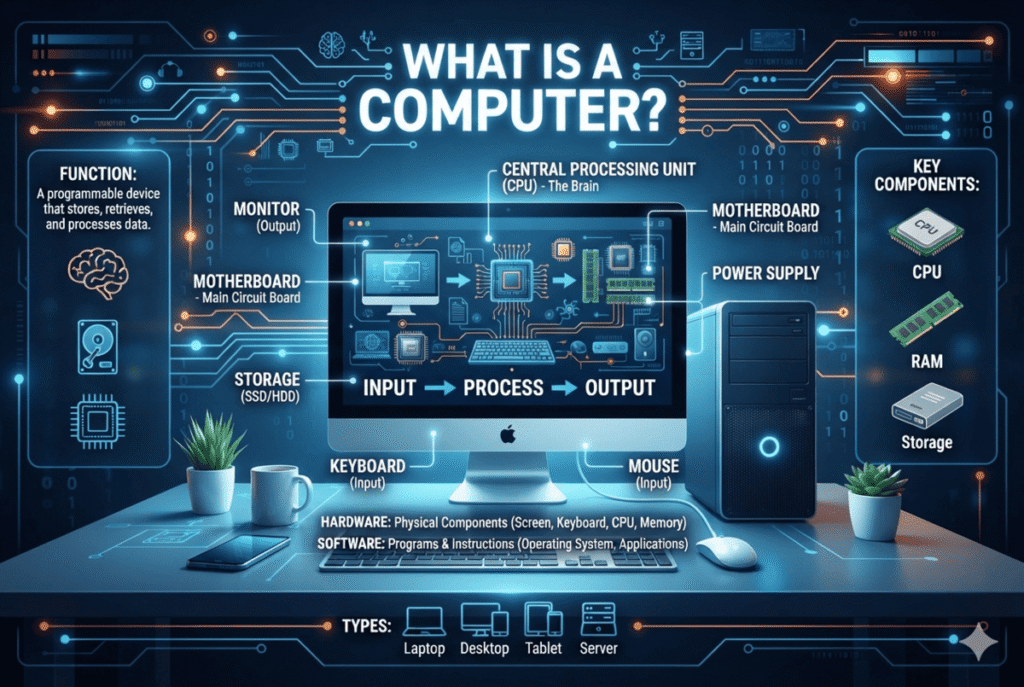
What Is a Computer is one of the most fundamental questions in Information Technology—and the answer is much more powerful than simply saying, “a computer is an electronic device.” A computer is a complete system designed to accept information, process it according to instructions, produce results, and store information for future use. Understanding this simple idea is the first step toward understanding how modern technology works.
You interact with computers every day.
You may use one to write a document, communicate with someone across the world, watch a video, manage a business, analyze information, create graphics, study, access financial services, or solve technical problems.
But beneath all of those activities is a remarkable process.
Information enters the system. The computer processes it. Results are produced. Information can be stored and used again.
That fundamental process is at the heart of computing.
For an IT professional, understanding what a computer really is provides the foundation for everything that follows—from hardware and operating systems to networking, troubleshooting, cybersecurity, and technical support.


🎯 Learning Objectives
By the end of this lesson, you should be able to:
- Define what a computer is in technical but understandable terms.
- Explain the fundamental purpose of a computer.
- Distinguish between data and information.
- Describe the basic functions performed by a computer.
- Explain the relationship between hardware and software.
- Identify common examples of computing devices.
- Recognize that a computer is a complete system rather than a single component.
- Explain why understanding computer fundamentals is essential for an IT professional.
🧠 What Exactly Is a Computer?
At its most fundamental level, a computer is a machine that processes data according to instructions.
That definition contains several important ideas.
A computer needs:
Data — the raw information that enters the system.
Instructions — rules or commands that tell the computer what to do.
Processing — the operations performed on the data.
Output — the results produced by the computer.
Storage — the ability to retain data and information for later use.
Put these elements together and we have the basic concept of computing.
A computer does not simply “think” or “know” things in the human sense.
It follows instructions and performs operations extremely quickly and consistently.
That is what makes computers so powerful.
🔄 The Basic Computer Process
One of the easiest ways to understand a computer is to think of it as an information-processing system.
A simplified model looks like this:
Input → Processing → Output
And Storage can support every stage by keeping data, instructions, and results available for future use.
For example, imagine entering a simple calculation into a calculator application.
You type:
25 + 17
That is input.
The computer processes the numbers and performs the mathematical operation.
That is processing.
The result:
42
is output.
If the calculation or related information is saved, it becomes part of storage.
This basic pattern appears everywhere in computing, even when the task is far more complicated.


📥 Input: Giving the Computer Information
Input is the information or data provided to a computer.
Input can come from a person, another computer, a sensor, a network, or another device.
Common input devices include:
- Keyboard
- Mouse
- Microphone
- Webcam
- Scanner
- Touchscreen
- Game controller
- Barcode reader
For example, when you type your name into a form, the keyboard provides input.
When you speak into a microphone, your voice becomes input.
When you scan a document, the scanner provides input.
Input does not have to come directly from a human.
A temperature sensor can provide information to a computer.
A network connection can deliver data from another computer.
A camera can provide images.
The important idea is this:
Input provides the computer with data or signals that it can process.
⚙️ Processing: The Computer Does the Work
Once data enters a computer, it must be processed.
Processing involves performing operations on data according to instructions.
The Central Processing Unit (CPU) is one of the primary components responsible for executing instructions and performing calculations in a general-purpose computer.
However, it is important to avoid thinking of the CPU as the entire computer.
The CPU works together with memory, storage, the motherboard, input and output devices, and software.
When you open an application, calculate a number, edit a photograph, or load a web page, many operations may occur behind the scenes.
The computer may:
- Retrieve instructions.
- Move data between components.
- Perform calculations.
- Compare values.
- Make decisions based on instructions.
- Transform data.
- Communicate with other components.
- Produce results.
All of this happens incredibly quickly.
That speed is one of the defining characteristics of modern computing.
📤 Output: The Computer Gives You Results
Output is the result produced by a computer after processing data.
Output can appear in many forms.
Common output devices include:
- Monitor
- Printer
- Speakers
- Headphones
- Projector
- Haptic or vibration devices
Suppose you type a document.
Your keyboard provides input.
The computer processes your keystrokes and the application displays the characters on the screen.
The monitor provides visual output.
If you print the document, the printer produces physical output.
If you use text-to-speech software, speakers can produce audio output.
The same computer can therefore transform information into different forms of output depending on what the user needs.
💾 Storage: Keeping Information for Later
Computers also need a way to retain information.
Storage allows data, applications, documents, photographs, videos, and other information to remain available after the computer is turned off.
Common storage technologies include:
- Solid-state drives (SSDs)
- Hard disk drives (HDDs)
- USB flash drives
- Memory cards
- External storage devices
- Network storage
- Cloud-based storage
Storage should not be confused with memory.
For example, an SSD can retain your files when the computer is powered off.
RAM, on the other hand, is working memory used by the computer while programs are running. It is a different type of resource with a different purpose.
This distinction becomes increasingly important as you progress through Professional IT Foundations.


🧩 A Computer Is More Than a Box
One of the first mistakes beginners make is thinking of “the computer” as only the physical box sitting beside a monitor.
A computer system is much more than that.
A complete computing environment may include:
- Hardware
- Software
- Data
- Users
- Instructions
- Input devices
- Output devices
- Storage
- Communication interfaces
- Network connections
These elements work together.
A powerful CPU without appropriate software is not enough.
Software without hardware capable of executing it is not enough.
Hardware and software must interact.
Data must be processed.
Users must provide instructions or interact with applications.
The result is a computer system.
This concept is extremely important because professional IT work is rarely about one component in isolation.
An IT technician must learn to think in terms of systems and relationships.
🖥️ Hardware: The Physical Side of Computing
Hardware refers to the physical components of a computer system—the parts that can be physically touched or handled.
Examples include:
- CPU
- Motherboard
- RAM
- SSD
- HDD
- Power supply
- Graphics processing unit (GPU)
- Keyboard
- Mouse
- Monitor
- Network adapter
Different computers contain different hardware configurations depending on their purpose.
A gaming computer may require powerful graphics hardware.
A business workstation may prioritize reliability, productivity, and manageability.
A server may be designed to handle many simultaneous users and services.
A laptop must balance performance, battery life, portability, and thermal constraints.
The hardware determines what a computer is physically capable of doing.
But hardware alone is not enough.


💻 Software: The Instructions That Make Hardware Useful
Software consists of programs, applications, and instructions that tell computer hardware what to do.
Examples include:
- Operating systems
- Web browsers
- Word processors
- Spreadsheet applications
- Media players
- Graphics applications
- Games
- Security software
- Programming tools
Imagine having a powerful computer with a fast processor, plenty of RAM, and a large SSD—but no operating system and no applications.
The hardware exists.
But the computer cannot provide the normal user experience you expect.
Software gives the hardware instructions and provides ways for people to interact with the system.
This relationship between hardware and software will become a major theme throughout Professional IT Foundations.
🔢 Computers Work With Data
Another important concept is data.
Data is the raw representation of information that a computer can store and process.
Data can represent:
- Numbers
- Text
- Images
- Audio
- Video
- Measurements
- Instructions
- Records
- Sensor readings
Computers ultimately represent digital data using combinations of binary values—commonly represented as 0s and 1s.
You do not need to master binary mathematics in this lesson.
What matters now is understanding the principle:
Human-readable information must be represented in a form that electronic computing systems can process.
For example, when you type the letter “A,” the computer does not store a tiny physical letter A inside the machine.
It stores a digital representation of that character.
The same principle applies to photographs, music, documents, videos, and other digital content.
🧠 Computers Do Not Think Like Humans
The phrase “computer thinks” is often used in everyday conversation.
Technically, however, computers do not think in the same way humans do.
A computer executes instructions.
It performs operations according to programmed rules.
This distinction becomes extremely important when studying IT.
Suppose a program receives two numbers and is instructed to compare them.
The computer does not “understand” the numbers in the human sense.
It performs the operations specified by the instructions.
Modern artificial intelligence systems can perform remarkably sophisticated tasks, including generating text, analyzing images, recognizing patterns, and producing predictions.
But these systems still operate through computational processes, algorithms, models, data, and hardware.
Understanding this distinction will help you develop a more accurate technical understanding of computing.
🌍 Computers Are Everywhere
When most people hear the word computer, they imagine a desktop PC or laptop.
But computing exists in many forms.
Computing devices include:
- Desktop computers
- Laptops
- Tablets
- Smartphones
- Servers
- Workstations
- Gaming systems
- Smart televisions
- ATMs
- Point-of-sale systems
- Industrial controllers
- Medical equipment
- Automotive systems
- Network devices
- Embedded systems
- Single-board computers
Some computers have keyboards and large monitors.
Others may have no traditional screen at all.
A computer inside an automobile may control specific systems.
A server may provide services to thousands of users without having a monitor attached.
A network device may perform specialized computing tasks while remaining almost invisible to the user.
This is why an IT professional must learn to recognize computing systems, not merely desktop PCs.


🏢 Computers in the Professional World
Computers have transformed virtually every modern industry.
Businesses use computers to:
- Manage financial information
- Communicate with customers
- Store records
- Analyze data
- Process transactions
- Manage inventory
- Coordinate employees
- Operate websites
- Provide online services
Schools use computers for:
- Learning
- Research
- Communication
- Administration
- Digital resources
Healthcare organizations use computing systems to support:
- Patient records
- Medical imaging
- Scheduling
- Laboratory systems
- Communication
- Equipment
Banks and financial institutions depend heavily on computing infrastructure for transactions, account management, security, communication, and data processing.
This means that understanding computers is not merely a technical interest.
It is increasingly part of understanding how modern organizations operate.
🧰 Why This Matters for an IT Professional
You might be wondering:
Why spend time learning something as basic as what a computer is?
Because strong technical professionals do not build advanced knowledge on weak foundations.
Consider an IT technician troubleshooting a computer that will not start.
Without understanding how a computer system is organized, the technician may simply try random solutions.
With a solid conceptual foundation, the technician begins asking better questions:
- Is the system receiving power?
- Is the hardware functioning?
- Is the computer completing its startup process?
- Is the operating system loading?
- Is the problem related to hardware or software?
- Is data accessible?
- Is a connected device causing the problem?
The difference is not simply technical knowledge.
It is technical thinking.
And technical thinking begins with understanding the system.


🔍 A Simple Real-World Example
Imagine that you are working at an IT support desk.
A user tells you:
“My computer isn’t working.”
That statement is extremely vague.
A professional technician does not immediately start replacing components.
Instead, the technician investigates.
Does the computer power on?
Does the display appear?
Can the user move the mouse?
Does the keyboard respond?
Does the operating system load?
Can applications open?
Is the Internet available?
Is only one application affected?
Each question helps narrow the problem.
The technician is using an understanding of the computer system to transform a vague complaint into a technical problem that can be investigated.
That is the beginning of professional troubleshooting.
🛠️ Practical Application
Identify the Computer Systems Around You
Look around your home, school, workplace, or community.
Identify at least five devices that contain computing capabilities.
For each device, answer:
- What is the device?
- What is its primary purpose?
- What information does it receive as input?
- What kind of processing does it perform?
- What output does it produce?
- What information does it store?
- Who uses it?
For example:
Device: ATM
Input: Card, PIN, and transaction selection
Processing: Verifies information and processes the requested transaction
Output: Screen information, receipt, and potentially cash
Storage: Transaction and account-related information may be stored within supporting systems
This exercise is designed to help you stop thinking of computers as isolated boxes and start recognizing computing systems in the real world.
📝 Lesson Summary
A computer is a system that processes data according to instructions.
At a fundamental level, computing involves:
Input → Processing → Output
with Storage providing a way to retain data and information for future use.
A computer system is made up of multiple elements working together.
Hardware provides the physical foundation.
Software provides instructions and applications.
Data provides information to be processed.
Users and other systems provide inputs and interact with the results.
The most important ideas from this lesson are:
- A computer is a complete system, not simply a box or a single component.
- Computers process data according to instructions.
- Input provides data to the system.
- Processing transforms or operates on data.
- Output presents results.
- Storage preserves information for future use.
- Hardware and software work together.
- Computers exist in many forms and environments.
- Understanding systems is fundamental to professional IT work.
If you understand these concepts, you have taken your first real step toward thinking like an IT professional.
🎯 Knowledge Evaluation
Before checking your answers, complete the following questions on your own.
Do not look for the answers in the lesson or elsewhere. The purpose of this evaluation is to help you determine how well you understand the fundamental concepts introduced in this lesson.
Take your time and answer every question.
Question 1 — Understanding
What is a computer?
Explain in your own words what a computer is and what its basic purpose is.
Question 2 — The Four Basic Functions
Which four basic functions describe what a computer does with information?
A. Connect, Print, Scan, and Delete
B. Input, Processing, Output, and Storage
C. Start, Run, Close, and Restart
D. Read, Write, Copy, and Paste
Question 3 — Hardware
Which of the following is an example of hardware?
A. Windows
B. Microsoft Word
C. RAM
D. A web browser
Question 4 — Hardware vs. Software
Explain the difference between hardware and software.
Give at least one example of hardware and one example of software.
Question 5 — Input
A user types a document using a keyboard. Which basic computer function is taking place when the keyboard sends the information to the computer?
A. Output
B. Storage
C. Input
D. Processing
Question 6 — Processing
Why is processing an essential function of a computer?
Choose the best answer.
A. It allows the computer to receive information from the user.
B. It allows the computer to transform data according to instructions.
C. It allows the computer to display information on a monitor.
D. It allows the computer to physically store files.
Question 7 — Output
A computer processes information and displays the result on a monitor.
Which basic computer function does the monitor represent in this situation?
Explain your answer briefly.
Question 8 — Real-World Scenario
Imagine that you open a calculator application and enter 25 + 15.
Identify what represents:
- Input
- Processing
- Output
Explain each one briefly.
Question 9 — Computer Systems
Is a computer system made up of hardware alone?
Answer Yes or No, and explain why.
Question 10 — IT Professional Thinking
A person tells you:
“My computer has perfectly working hardware, but it cannot run the program I need because the required software is not installed.”
What does this situation demonstrate about the relationship between hardware and software?
Explain your answer in your own words.
🏁 Finished?
Before checking your answers, review what you wrote.
Ask yourself:
Did I answer based on what I understand, or did I simply guess?
When you are ready, select:
You will be taken to the Answer-Lesson-1, where you can compare your answers, read the explanations, and evaluate your performance.
Remember: the goal is not simply to get the answers right. The goal is to understand the concepts.
 Continue Your IT Journey
You now understand what a computer is.
The next question is even more interesting:
How does a computer actually process information?
That is where we go next.
Lesson 2 — How Computers Process Information
You will explore what happens between the moment data enters a computer and the moment the system produces a result.